



Free statistics for agricultural and allied research.
Paste your field data, choose the design, and get the assumption checks, the ANOVA with the right
error terms, tables of means ready for a paper, charts, and a plain-language reading of every result.
R runs inside the web page, so there is nothing to install and your data stay on your computer.
Open the app · Take the tour · Install in R · Cite · What's new
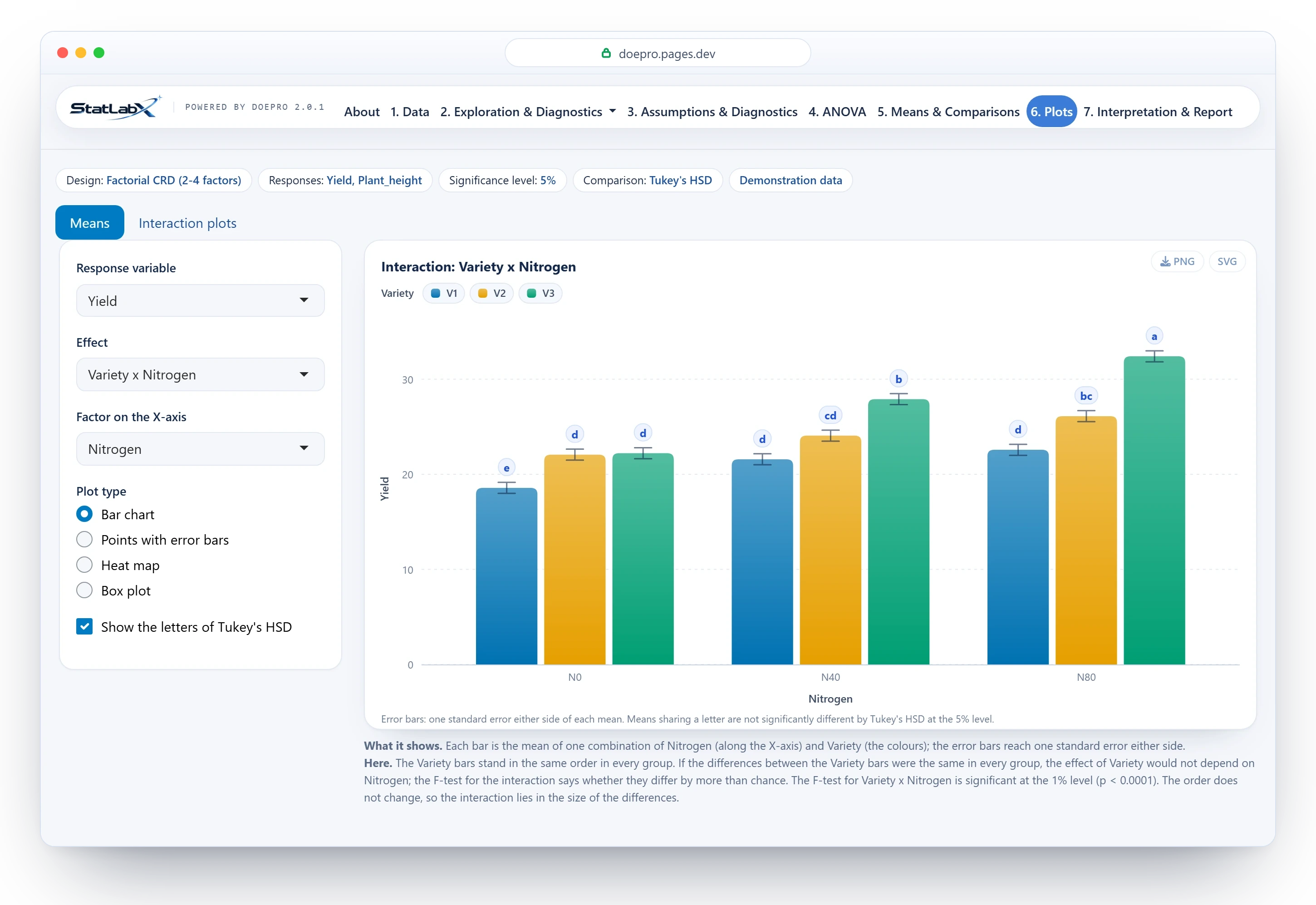
Most field experiments end in the same analyses: an ANOVA that fits the layout, means compared the way journals expect, and a careful word about what the numbers do and do not show. StatLabX does exactly that, free, in a browser, and explains every step in plain language for students and researchers who are not statisticians. It is powered by DOEpro, an R package on CRAN that you can also use from R.
 Eleven field designs CRD, RCBD, Latin square, factorials of two to four factors, split and strip plots, and pooled analyses over seasons or locations, each with the error terms its layout calls for. |
 Seven ways to compare means The C.D. (Fisher's protected LSD), Tukey's HSD, Duncan's DMRT, SNK, Scheffé's test, the Bonferroni-adjusted LSD and Dunnett's test against a control. Letters appear only when the F-test is significant. |
 Checks before conclusions Normality of the residuals, equal variances, Tukey's test of additivity, Cook's distance, Taylor's power law and the Box-Cox profile, each with what it means and what to do about it. |
 Readings in plain English Every table and chart is followed by what it shows and what this result means, worded to match the evidence: a test that is not significant reads as insufficient evidence, never as proof of no difference. |
 Explore before you test Descriptive statistics, correlation, simple and multiple regression, principal components, cluster analysis and factor analysis, each with a reading of what it shows. |
 Ready for the paper Tables of means with SE(m), SE(d) and C.V., charts that download as 300 dpi PNG or SVG, and a report to print or save as PDF. |
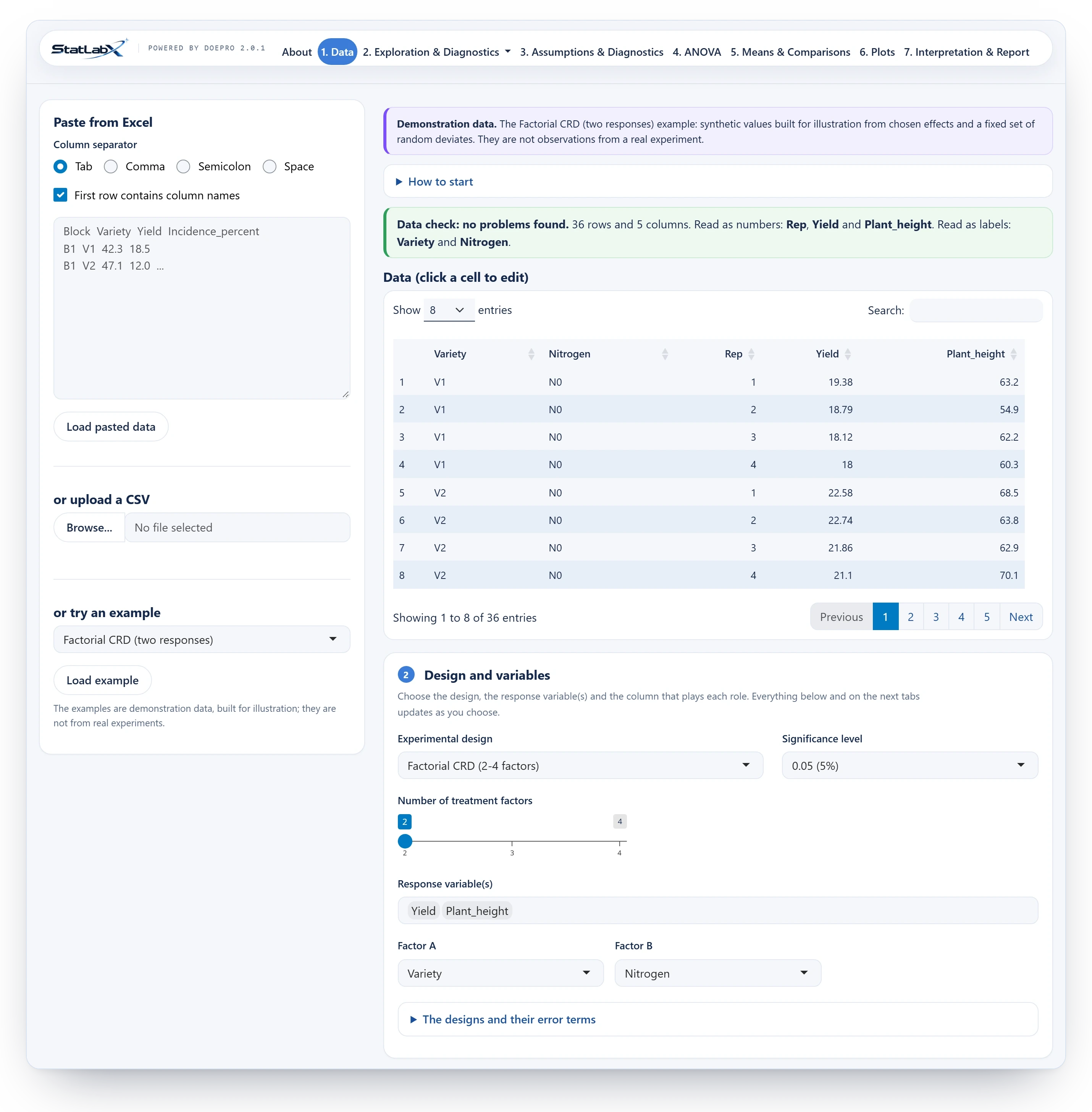
Paste straight from Excel, upload a CSV, or start from the example for any design. A data check corrects only what is certain, such as a decimal comma or "n/a", and lists everything else for you to decide. Then choose the design and the role of each column. Every result that follows updates as you choose; there is no Run button.
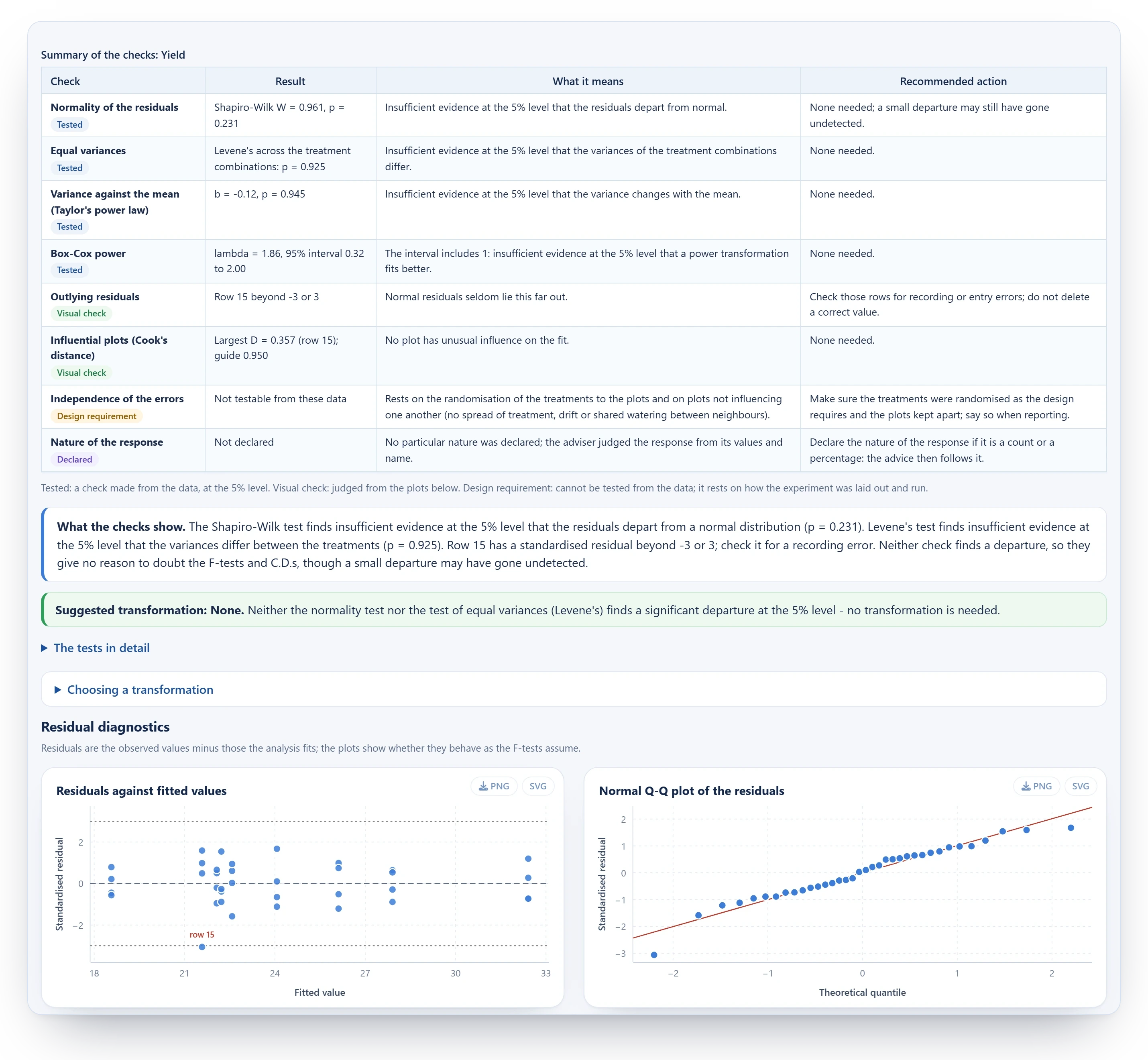
Each check sits beside its result, what it means and what to do about it, with the residual plots that show what the tests test. Nothing is transformed behind your back: the app suggests a transformation with its reasons, offers only those defined for your values, and applies one only when you choose it.
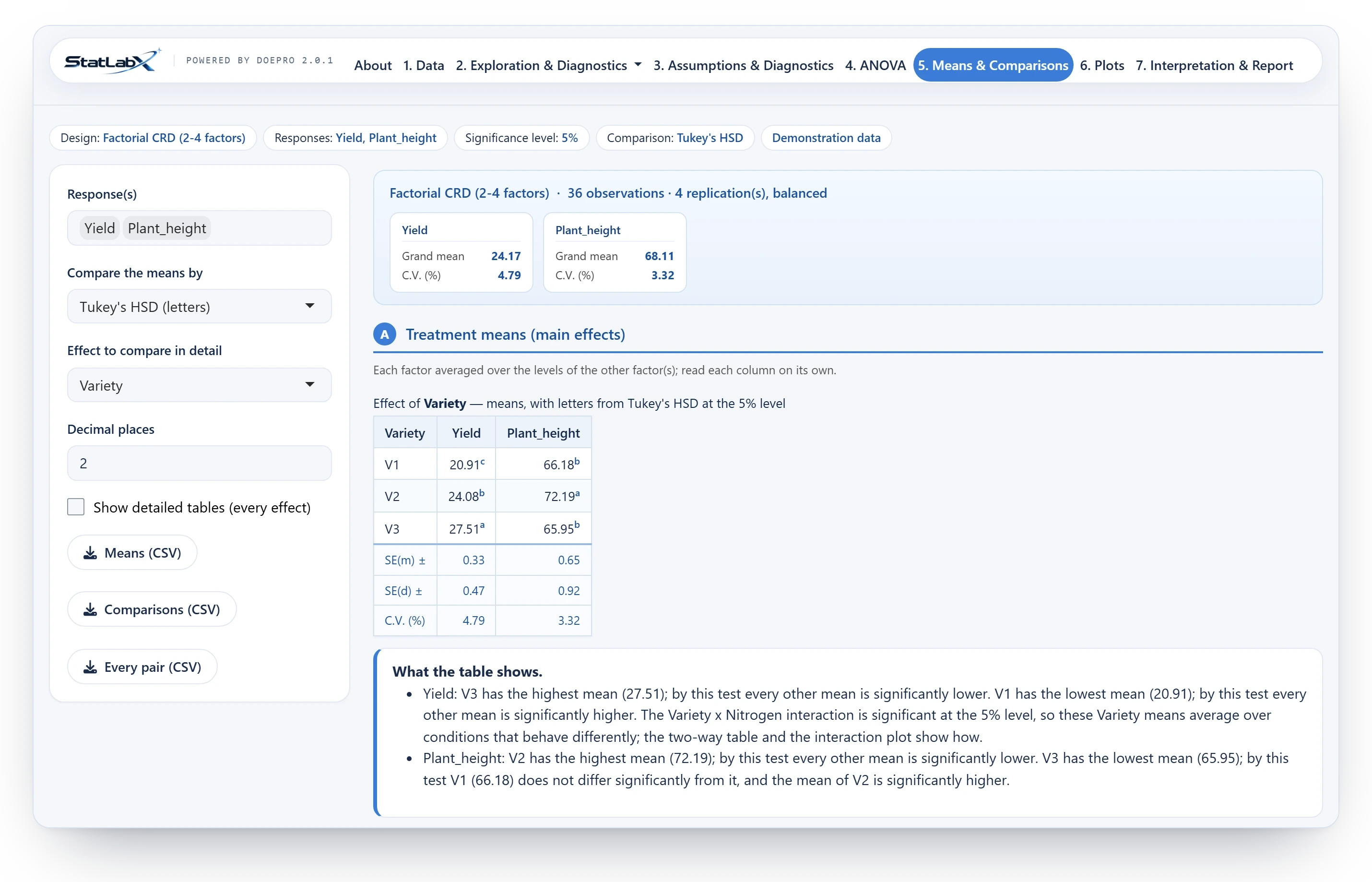
Choose how the means are compared and the tables follow: the superscript letters of the procedure you chose, or the critical difference, never both. SE(m), SE(d) and C.V. sit at the foot, two factors make the familiar two-way table, and the reading says which means differ at your significance level.
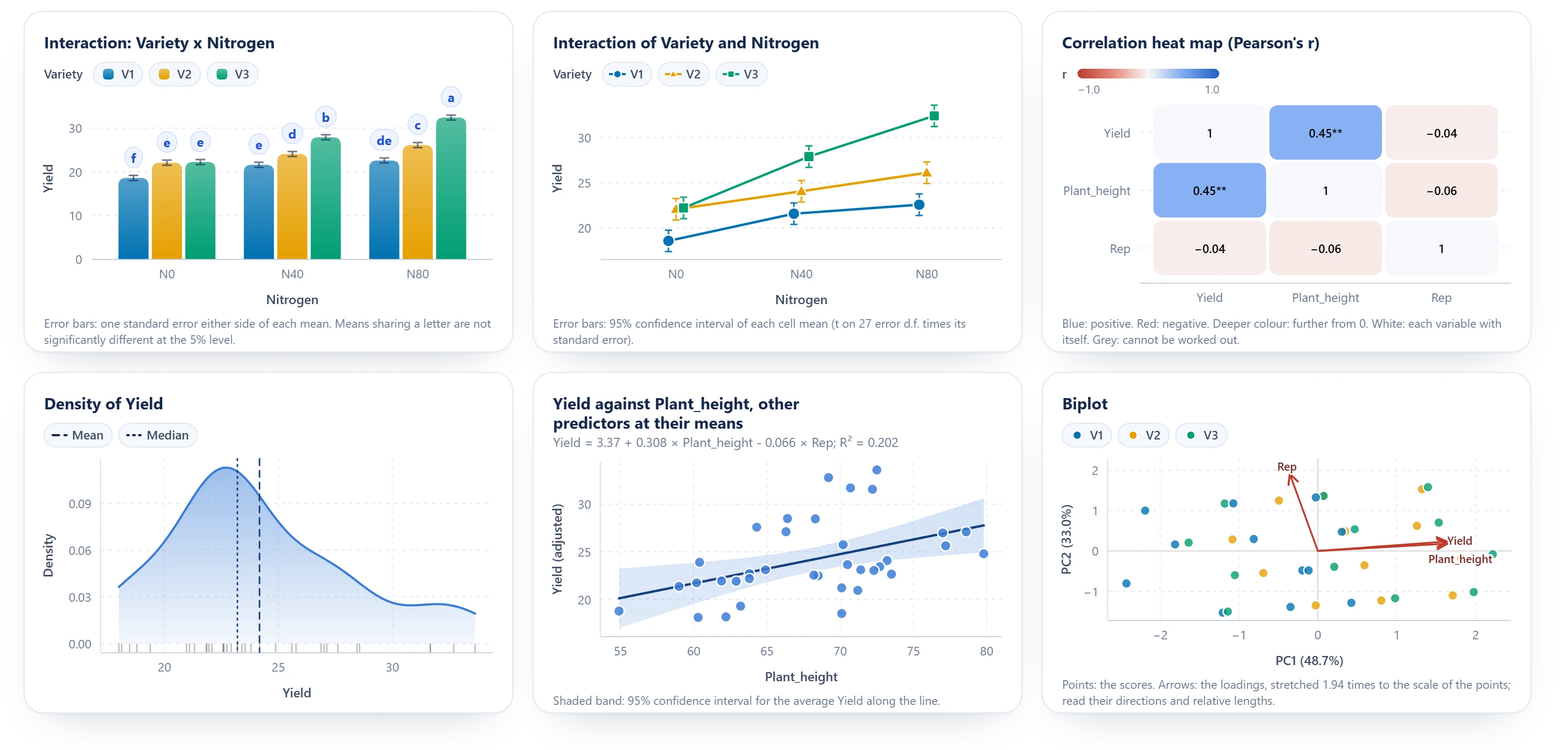
Every chart is drawn in your browser from exactly what ggplot2 computes, with the grouping letters as pills and a tooltip on every mark, and redrawn to fit any screen. Each one downloads as a 300 dpi PNG or an SVG for your paper or slides.
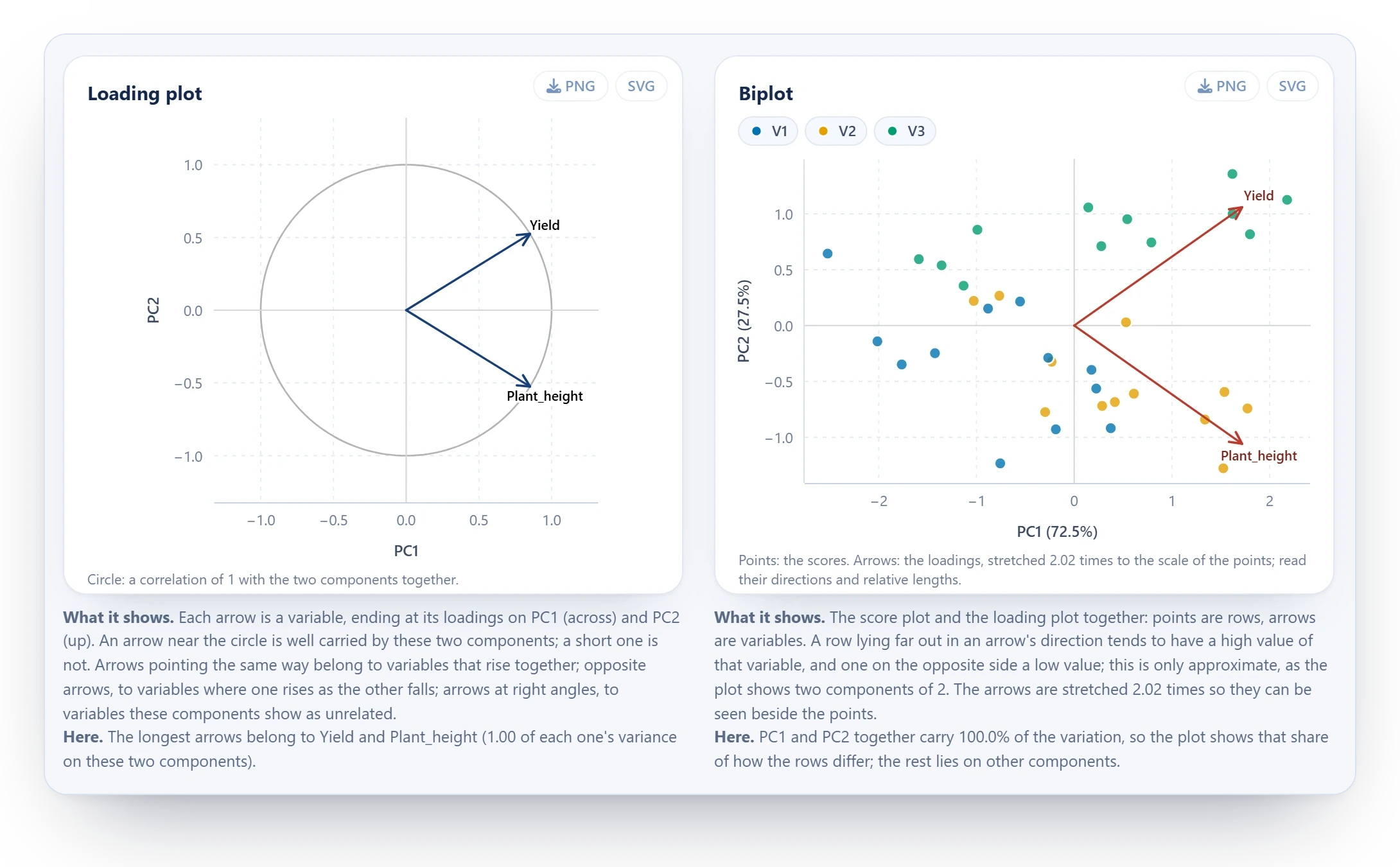
Principal components, correlation, regression, cluster and factor analysis, each with a reading of what the numbers and plots show, and of what they cannot show.

The web app runs this R package with Shiny on webR, a version of R built for WebAssembly: R itself runs in your browser tab. There is no server, so the platform costs nothing to run, a whole class can use it at once, and the data you paste are never uploaded. The first visit loads R, about 60 MB; later visits start faster from your browser's cache.
Checked against the textbook. Five worked examples from Gomez and Gomez (1984), Statistical Procedures for Agricultural Research (CRD, RCBD, Latin square, split plot and a combined analysis), are reproduced exactly, apart from one documented choice: in pooled analyses the environment is treated as random. Run them yourself:
source(system.file("validation", "textbook_validation.R", package = "DOEpro"))
7,678 automated checks in 532 tests compare the statistics with independent computations:
lm(), cor.test(), prcomp(), hclust(), factanal(), TukeyHSD(), Dunnett's published tables
and the textbook formulas.
Rules it never breaks. The error term matches the design: split and strip plots get their strata, and pooled analyses test each effect against its own interaction with the environment. Letters appear only when the F-test is significant, and never beside a C.D. A procedure is never relabelled as another. Standard errors stay on the scale they were computed on. Every verdict is worded at the significance level you chose.
install.packages("DOEpro")                        # from CRAN

# install.packages("remotes")
# remotes::install_github("Uzairkhan11w/DOEpro")
install.packages("DOEpro", repos = c('https://uzairkhan11w.r-universe.dev', 'https://cloud.r-project.org'))    # the development version

library(DOEpro)
run_DOEpro()                                      # the app, on your own computer
CRAN has version 2.0.1. Everything shown on this page is in the web app and the development version, and reaches CRAN with the next release. The package depends only on shiny, bslib, DT, ggplot2 and rlang, which is what keeps the browser version light.
The analyses can also be run from R:
d   <- demo_data("RCBD")
res <- analyze(d, "RCBD", map = list(response = "Yield", treat = "Variety", block = "Block"))
res$anova                    # the analysis of variance
res$effects$Variety$means    # the means, with their standard errors
| Function | What it does |
|---|---|
run_DOEpro() |
Opens the app on your own computer |
analyze(), run_all()
|
The ANOVA, means and comparisons for any of the eleven designs, for one response or several |
comparison() |
How the means are compared: the C.D., one procedure's letters, or Dunnett's test |
build_report() |
The full report, as HTML |
check_data(), fix_data()
|
The data check, and the corrections that are certain |
describe_data() |
Descriptive statistics, optionally by group |
correlate_data() |
Pearson's, Spearman's or Kendall's correlation, with exact p-values where they can be had |
regress_data() |
Simple and multiple regression, with checks of the residuals |
pca_data() |
Principal components, with parallel analysis |
cluster_data() |
Hierarchical clustering, with the number of clusters from silhouette widths |
fa_data() |
Factor analysis, with KMO and Bartlett's test |
demo_data() |
The example data set for each design |
| Design | Columns needed | Error term(s) |
|---|---|---|
| Completely randomised (CRD) | treatment, response(s) | single pooled error |
| Randomised complete block (RCBD) | block, treatment, response(s) | single pooled error |
| Latin square (LSD) | row, column, treatment, response(s) | single pooled error |
| Factorial CRD (2–4 factors) | factors A–D, response(s) | single pooled error |
| Factorial RCBD (2–4 factors) | block, factors A–D, response(s) | single pooled error |
| Split plot | replication, main plot, sub plot, response(s) | Error(a), Error(b) |
| Strip plot | replication, factor A, factor B, response(s) | Error(a), Error(b), Error(c) |
| Pooled analysis over environments (RCBD base) | environment, replication, treatment, response(s) | R(env), pooled error |
| Pooled analysis over environments (CRD base) | environment, treatment, response(s) | pooled error |
| Pooled factorial over environments (RCBD base, 2–4 factors) | environment, replication, factors A–D, response(s) | each effect against its environment interaction; pooled error |
| Pooled factorial over environments (CRD base, 2–4 factors) | environment, factors A–D, response(s) | each effect against its environment interaction; pooled error |
Data go in long format: one row per plot, one column per variable.
A split plot needs four different SE(d), and the app prints all four:
A strip plot needs three error strata and the analogous mixed comparisons. In a pooled analysis the environment is random: each treatment effect is tested against its own interaction with the environment, and the means of an interaction carry the SE(d) of each kind of comparison.
The tables show one comparison at a time, chosen on the Means & Comparisons tab:
One factor, several responses: one row per treatment, one column per measured character (here with Tukey's HSD):
| Treatment | Yield | Plant height | Fruits per plant |
|---|---|---|---|
| T1 | 42.30 ᶜ | 78.4 ᵇ | 31.2 ᵇ |
| T2 | 47.10 ᵃ | 84.9 ᵃ | 38.7 ᵃ |
| SE(m) ± | 1.26 | 2.1 | 1.4 |
| SE(d) ± | 1.78 | 2.97 | 1.98 |
| C.V. (%) | 7.60 | 5.31 | 9.02 |
Two factors: the familiar grid with marginal means, and the standard errors of the three comparisons underneath (here with the C.D.):
| Factor 1 \ Factor 2 | I1 | I2 | I3 | Mean |
|---|---|---|---|---|
| T1 | 30.70 | 36.12 | 41.06 | 35.96 |
| T2 | 36.56 | 38.92 | 46.62 | 40.70 |
| Mean | 33.63 | 37.52 | 43.84 | 38.33 |
SE(m) ± 0.86 / 0.70 / 1.22 SE(d) ± 1.22 / 0.99 / 1.72
C.D. (5%) Factor 1: 2.71 Factor 2: 2.21 Factor 1 × Factor 2: NS
C.V. (%) 5.49
A C.D. is printed only when the F-test for that source is significant; otherwise the cell reads NS.
Letters likewise appear only under a significant F-test, in the CSV export too. When a response has been
transformed, each cell shows the back-transformed mean with the transformed value in parentheses, and the
SE, C.D. and C.V. refer to the transformed scale, because that is the scale the tests were done on.
With unequal replication each mean carries its own SE, each pair of means its own SE(d) and C.D., and the footer gives their range rather than one figure that fits only some of the means. In a blocked design with a missing plot, or a factorial with unequal cells, the means are adjusted (least-squares) means and each term is tested adjusted for the others. An interaction can be compared within each level of one of its factors (simple effects).
Eight transformations are available: log y, log(y + 1), √y, √(y + 0.5), arcsine √(y/100) for percentages, arcsine √y for proportions, 1/y, and the Box-Cox power with its optimal λ. The adviser reads the residual checks, the mean-variance slope (Taylor's power law), the Box-Cox profile and what the response is (a count, a percentage or a continuous measurement), and names a transformation with its reasons. A 0–100 range on its own is not taken as evidence of percentages, since most yields and plant heights live there too. Nothing is transformed until you choose it, and only transformations defined for your values are offered.
Print / Save as PDF opens the browser's print dialog with the report laid out for A4: tables kept
whole, and wide tables on landscape pages where the browser allows. Choosing Save as PDF gives a PDF, in
the browser version too. Download HTML saves the report as one self-contained page. Download PDF
appears only where the computer has a rendering engine: pagedown (with Chrome or Chromium),
weasyprint or wkhtmltopdf. The report carries the StatLabX credit line, the DOEpro version and the
date.
|
Dr. Immad A. Shah Scientist (Statistics) Division of Agricultural Statistics, SKUAST-Kashmir ORCID · Email |
Mr. Uzair Javid Khan Maintainer · UG Research Student, Statistics AAAMDC Bemina, Cluster University Srinagar ORCID · Email |
Dr. M. Iqbal Jeelani Scientist (Statistics) Division of Agricultural Statistics, SKUAST-Kashmir ORCID |
Dr. Imran Khan Chief Scientist Division of Agricultural Statistics, SKUAST-Kashmir |
Dr. Pradeep Mishra Assistant Professor JNKVV, Madhya Pradesh |
Suggestions, bug reports and questions are welcome: open an issue or write to the maintainer at uzairkhan11w@gmail.com. If StatLabX helps your research or teaching, a star on GitHub helps others find it.
If StatLabX or DOEpro contributes to work you publish, please cite it:
Shah, I. A., Khan, U. J. and Jeelani, M. I. (2026). DOEpro: Analysis of Designed Agricultural Experiments. R package version 2.0.1. doi:10.5281/zenodo.21399570
@software{doepro2026,
  author  = {Shah, Immad A. and Khan, Uzair Javid and Jeelani, M. Iqbal},
  title   = {DOEpro: Analysis of Designed Agricultural Experiments},
  year    = {2026},
  version = {2.0.1},
  doi     = {10.5281/zenodo.21399570},
  url     = {https://github.com/Uzairkhan11w/DOEpro}
}
The DOI is the concept DOI: it always resolves to the latest release. GitHub's Cite this repository
button reads CITATION.cff and gives the same reference, and citation("DOEpro") gives it in R.
GPL-3 or later. DOEpro is free software: you may use, study, share and change it under the terms of the GNU General Public License.
StatLabX · powered by DOEpro · free statistics for agricultural and allied research
Back to the top